BeMusicSeeker Unofficial Fork

Overview
This project is an unofficial fork created by decompiling, modifying, and rebuilding BeMusicSeeker.exe bundled with Sayaka / 黒皇帝's BeMusicSeeker-installer.
This fork was not made with direct permission from the original binary author, @rib_2_bit. However, because the original binary was distributed under the MIT License, we believe creating and publishing this derivative version is permissible.
This repository publishes the application source reconstructed from decompilation and subsequently modified, along with tests, development history, and releases. Development takes place on dev; main contains officially released code and published data. To use the application, download a package from Releases.
Installation
For first-time setup, operating modes, and screen-by-screen usage, see the User Manual.
- Install Everything 1.5 (x64) if possible - The app can run without Everything, but startup, reload, and install-destination estimation are much faster in large libraries when Everything is available. - After installing Everything, let it finish indexing the directories that contain your BMS files before starting BeMusicSeeker.
- Download the release package
- Download the latest package from the Releases page.
- Before extracting it, right-click the downloaded ZIP, open
Properties, and if anUnblockcheckbox appears near the bottom of the window, check it and pressApply. This clears the safety mark Windows adds to downloaded files before the files are extracted.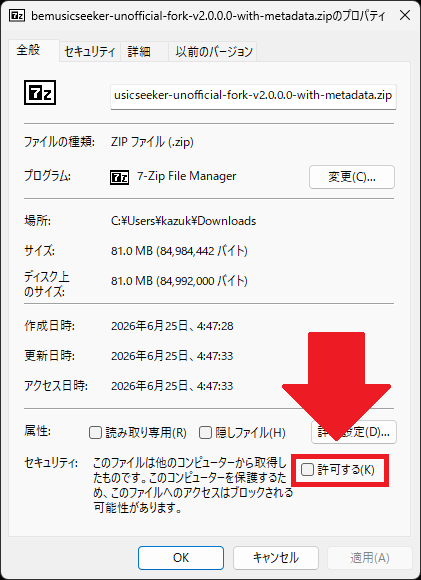 - Do not run the app directly from the ZIP. After applying
 Unblock, extract it into any writable directory. The app is portable and does not require installation. - First launch and settings
- The first launch opens the language selection and settings dialogs. Choose the operating mode and configure BMS directories, and when using LR2 mode,
song.db,config.xml, score DB, and related paths. - See Initial Setup and Settings Dialog. - If a traditional BeMusicSeeker installation already exists, its settings are copied automatically. The copied settings are stored under.\config\user.configin this fork's directory, so the original BeMusicSeeker installation is not modified. - When using LR2 linked mode, back upsong.db,config.xml, score DB, and related files before the first scan. - Usage and logs
- See the User Manual for basic operations.
- See Install / Pending Packages for chart installation and pending-package workflows.
- See the Keyword Search Syntax Guide for advanced search syntax.
- Logs are written by default under
log/asapplication.logandinstall-performance.log. See the INFO log guide for how to read them.
Change Summary
This section highlights representative improvements. See the User Manual for details and cautions.
This fork includes features that can modify or delete BMS-related databases and files. Use it at your own risk.
Main improvements
- Faster startup, reload, and chart installation
- Uses Everything 1.5 (x64) for fast file enumeration and reworks initialization, file-diff, and DB update processing.
- Focuses on workflows that become heavy in large libraries, including install-destination estimation, pending-package processing, duplicate-file checking, and playlist display.
- The main list view has been reorganized around a custom table view with column settings, sorting, tooltips, and playlist summaries that remain usable in large environments.
- bmson support
- bmson files can be handled as chart files alongside BMS / PMS in the library, installation, duplicate checking, and playlist display.
- Built-in audio playback and audio conversion support bmson 1.0.0 and legacy 0.21. See Playback / Recording.
Other notable improvements
- Standalone mode
- The library can be managed with
data/song.dbunder the app directory without using LR2'ssong.db. - Portable app packaging
- Settings are saved under
config/user.configin the extracted directory. Existing BeMusicSeeker settings are copied on first launch. - Install / pending-package improvements
- Adds and improves differential destination estimation, manual destination input, merge-destination estimation, smart overwrite, cleanup of already-owned packages, and zero-note chart invalid-extension rename.
- Playlist improvements
- Adds playlist summary, external sync
STATUS, single/range reload, and URL1/URL2 completion improvements. - Can export all playlists as aggregated
.bmttable cache files under beatoraja'stabledirectory. This is intended for environments where beatoraja's own level aggregation is slow. - Maintenance improvements
- Adds and expands status-check screens such as LR2 compatibility warnings, zero-note search, parse errors, full resource scan, and duplicate-file checking.
- UI, logs, and multilingual support
- Improves theme support, settings dialog organization, status-bar progress, log output, and multilingual resource handling.
- Play history
- In LR2 linked mode, BeMusicSeeker can install the play-history support objects into the LR2 score DB and show LR2 plays recorded after that setup. The view includes date navigation, update types, judge count, play count, play time, clear breakdowns, and playlist-based FOLDER projection.
- In beatoraja linked mode, BeMusicSeeker shows score update history from beatoraja's
scorelog.dband uses thescore.dbplayer aggregate for daily play count, judge count, and play time. This is treated as beatoraja's update history, not as full play-by-play history at LR2's granularity. - LR2 history before the play-history setup cannot be recovered. See LR2 Play Log and Play Log in the manual for setup details and cautions.
TODO
These are rough notes. Priority is mixed, and completed items are removed over time.
- BMS Score Viewer screen for unregistered charts - Should md5 values that could not be uploaded, for example because the chart was too large, be stored locally? Otherwise they may remain in the unregistered list indefinitely. - The approach used by bms-score-uploader seems like a good reference.
- Download LR2IR rival data, import it into
song.db, and create WIN/LOSE folders per difficulty table - Course content display and ordering editor
- Replace hardcoded URLs that are now broken
- Consolidation feature for duplicate
.wavand.oggfiles
License Scope
The project's first-party source code is distributed under the MIT License, following the original binary. External components and third-party chart data included in tests remain subject to their respective rights holders' terms.
- Project source code: MIT License. See
LICENSE. - Third-party binaries, fonts, SDKs, and similar components: These bundled external components are governed by the licenses and terms of their respective providers.
- If terms conflict, the provider's license and notices take precedence for that component.
Audit trail and third-party notices
ThirdPartyNotices.txt: notices and legal-risk notes for bundled dependencies.third_party/licenses/: original license texts for bundled proprietary components, fonts, and similar assets.
Important Notice About BASS
The release package includes BASS-related audio components that are outside the scope of the MIT License.
These native binaries are not open source. The current release is non-commercial, non-revenue end-user software and is classified GREEN for the BASS core and official add-ons, BASSASIO, and BASS_FX under their upstream terms. BASS_FX is a third-party add-on attributed to JOBnik / Arthur Aminov. If a future release becomes commercial or monetized, review the applicable upstream terms before distribution; that future trigger is not a current YELLOW condition. The ManagedBass bindings are MIT licensed; see the third-party notices for the separate terms.